7 Benefits of Curbside Pickup for Restaurants

Curbside pickup for restaurants is not a new concept. When you think of it, it is a kind of variation of BOPIS (Buy Online, Pickup In-Store). However, with the rise of the pandemic, customers opted for collecting orders from curbsides, for even entering a closed area like a restaurant for a few minutes may pose a Covid threat.

Below are seven benefits of curbside pickup for restaurants and why it is the right thing to do.

1. Reduced delivery costs

A win-win situation where customers don’t have to pay a full-delivery fee- if not any- and where your restaurant lowers/cancels its delivery fee, increases its profit and offers more discounts for promotional purposes. You may even give an extra 10% discount for customers who go for your curbside pickup service.

2. Increased overall sales

Curbside pickup for restaurants shows an average growth of 23% in sales! With such an increase in overall sales, restaurant chains will inevitably grow as well. Even with a small percent of your customers favoring curbside pickup, the trend is guaranteed to be taken up by many more in the future.    

3. Easier for customers

Curbside pickup service allows customers to order what they want, when they want it, and how they wish to get it. Customers are in charge of the process as they drop by the curbside within a set timeframe to collect their orders themselves. The easier curbside pickup for restaurants is, the more likely customers will keep coming back.

4. Strengthened brand image

Adopting a curbside pickup option means your restaurant brand image is being customer-centric. It means your brand caters to its customers’ needs in terms of what they want and the way they want to collect it. With curbside pickup for restaurants, customers have more options and flexibility.

5. More flexible for customers

Flexibility is important to many customers. Imagine many of your customers live in apartments or super busy areas where doorstep deliveries can be much of a hassle. Curbside pickup for restaurants offers customers flexibility that could improve their customer experience. You may still apply the rules, policies, and standards that hold your restaurant business together, yet still, be flexible.

6. Up-to-dateness

The restaurant business is gaining momentum, especially with lockdown lifting. You’ll find that curbside pickup for restaurants is being adopted by many of your competitors. Whatever you do, you don’t want your restaurant to fail at adapting to the latest trends in the business. If you lag, you may, unfortunately, lose customers especially the younger segment.

7. Boosted customer loyalty

Even though customers like to often try new diners, still a satisfying customer experience is reason enough to bring back a loyal customer to your restaurant. Show flexibility and make your dining, takeout, and curbside pickup a positive experience, then you’ll become a winner. Check out Taker for an online ordering system with a curbside pickup feature.
How to Make a Successful Restaurant App |Technology & Features

Recently, the food industry has been totally influenced by restaurant and food delivery apps. Several studies prove that a restaurant app comes high on the list when considering a prosperous restaurant business.  However, a food ordering app doesn’t guarantee instant success nor high demand among customers. With a myriad of possibilities in the restaurant app field, most restaurant owners choose to invest in a food ordering app.

Developing a successful food ordering app depends on many factors such as mobile technology, functions, features, and platform. Below we list some tips to consider for a successful restaurant app.

1. Choose the right technology:

  • The right mobile platform: First things first; decide the platform that will support your restaurant app. The wisest decision is to consider an app for both Android and iOS platforms to cover all target audiences.
  • A unique customer experience: Then, create a remarkable guest experiencethrough your restaurant app.And make sure the app is integrated into your POS and kitchen ticketing systems so that customers can track their orders.
  • The right technology: After that-depending on your app budget and the features you want- choose a mobile app development technology from PHP to Rugby or Flutter.
  • An intuitive UI/UX design: The intuitive UI/UX of your restaurant app ensures it runs flawlessly, lightly, and smoothly in food selection, ordering, order processing, and payment.

2. Choose the right features and functions:

Restaurant app competition is high which requires you always make sure yours stands out among the rest. Involve a unique, sleek design, user-friendly navigation functions, and customization features to accommodate your users’ needs.

Here are some of the features and functions you may want to include:

  • Detailed menu specifications like ingredients, calorie count, prices, pictures, and reviews.
  • An easy location of your restaurant on a geo-map.
  • An order and delivery tracking system to allow customers to track their orders.
  • Online payment methods such as debit/credit card, net banking, and e-wallets beside the regular cash on delivery method.
  • Login through social media accounts.
  • Order and delivery history.
  • Registration and profile management.
  • Booking system for in-advance table-reservation.
  • Discounts, offers, promos, deals, cashback, and reward points.
  • Push notifications for order confirmation, preparation, and readiness for delivery.
  • Evaluation and feedback system.
  • Dish recommendations.

Today, restaurant owners who are late to launch a food ordering and delivery app are most likely to suffer a huge loss in the next months. Investing in a restaurant app is not only a sound investment but also a smart decision, especially with recurrent lockdown due to the pandemic.

Now that you have an idea where to start, it’s time to take your restaurant business a step further with a restaurant app. For more details and to learn about Taker, click here

Why Your Restaurant Needs POS Integration

If you’re a restaurant owner, you probably have some repeat guests who regularly spend a good deal of money at your restaurant. Such information you may have come across through mere observation, but other valuable information may go unnoticed if there is no POS integration.

What is POS?
A point-of-sale system, or POS, is the place where customers make payments for products or services at your business. POS software isn’t limited to credit card payment transactions. It also tracks sales and inventory, adjusts prices, and gives sales reports.

What is POS integration?

Technology isn’t new when it comes to restaurant management. Think reservations, online ordering, stock management, loyalty programs, etc., all are aspects of restaurant digitization. But if you want to know a customer really well, the answer is data integration. In other words, instead of having a POS data system and a reservation management system run separately, why not integrate both and have a wider picture of what is going on in your restaurant. Hence, POS integration.

How do POS and reservation management systems complement each other?

A POS system would typically be used to monitor restaurant revenue and evaluate its menu based on sales and profit. One drawback of POS systems is their using tickets instead of data. This is overcome by POS integration with a reservation management system. Once POS integration takes place, you get insights into guest and server monthly revenue as well as average guest monthly spends, trends, lifetime value, and spend per reservation.

How does POS integration work?

Typically, data flows from the POS terminals to a centralized POS server, then to a cloud-based data warehouse – through custom integration software-, and finally to the system where the data is being shared.

For help with custom POS integration, check out the various package features offered by Taker

What are the 3 top pros of POS integration?

The greatest three benefits of integrating POS and reservation management systems are as follows:

1. Customized service

POS integration helps you identify VIP guests as the system spots high spenders as per revenue as opposed to the number of visits. Knowing your VIPs means knowing your strongest supporters and, thus, your brand ambassadors. When you offer your VIPs complimentary dishes or discounts, you easily get them to spread the good word around your restaurant.

2. Segmented marketing strategies

Thanks to POS integration, you can tweak your marketing strategies based on ‘guest’ segmentation. For instance, you may come up with new ideas for targeted messaging based on birthdays, food preferences (e.g., allergen-free or vegetarian), preferred dining days and times, and many more.

Even if a VIP guest hasn’t been to your restaurant for some time, you can win them back with a customized win-back offer based on their favorite dish.

3. Improved customer service

A dissatisfied customer may voice their opinion through a negative review which is something you may want to prevent from happening. As you reach out to them, and as you understand their complaint, POS integration shall add more context to the situation and help you handle it as best you can.

For more information on choosing a POS system for your restaurant, click here

Why Restaurant Kiosks are Important?

The nature of restaurants is changing like never before and what is driving this change is technology. Of course, this is happening to keep up with the demanding customers who already have embraced technology in all ways. One aspect of it is self-service restaurant kiosks.

Here we talk about the top reasons why restaurant kiosk is spreading:

Improve Service Efficiency

If you have a busy restaurant, changes are you’re going to a long queue of customers waiting to order. No doubt, this can be very frustrated for hungry customers and very stressful for your staff. That certainly might lead customers to stop coming back to you which is bad.

Self-service kiosks help you avoid all of that because customers order on their own without need a cashier to take their orders.This will have a direct positive impact on revenue as restaurants can have more orders while maintaining a good customer experience. At the same time, this takes the pressure off your staff which makes them much more productive.

Increase Revenue

Visually presenting the menu in an appealing way revokes customers’ appetite. With a click away, they are motivated to add more items to the cart easily and simply. Moreover, restaurants can smartly show high margine items first in the kiosk menu which increases the likelihood that customers will buy them. Also, Taker kiosk equips restaurants with a configurable cross-selling functionality that shows up while customers’ are checking out. Here is Applebeebee’s kiosk report

Beside that, kiosks help increase throughput, which helps increase revenue. Also, it improves customer experience and ,in turns, loyalty which means more frequent visits.

Get Accurate Orders

In many places on earth, people may not speak the same language so they tend to use a common one that might be poorly spoken. With that, cashier or intercom agent might get the order wrong which badly frustrates the customer.

Restaurant kiosk with a visual menu in front of the customer, the margin of errors is greatly reduced. Which means, less frustration for customers, less pressure for staff and happy experience.

Cut Labor Costs

By freeing cashiers from consuming their times taking orders, restaurants’ managers can cut down staff members. Or, if restaurant kiosk leads to more customers and orders, they can be moved from front-of-house to kitchen and customer service. This means you don’t have to hire more staff.

To learn more about Taker Kiosk, contact us on the link below


If your restaurant is looking for an online ordering system

contact us now.


Restaurant Menu Items per Branch

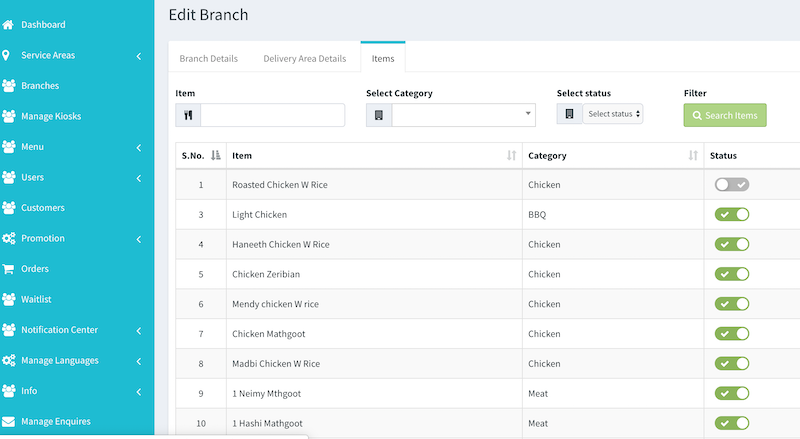
Taker is bringing to you a new feature that allows you to control the availability of your restaurant menu items for each branch. A common scenario is that restaurants with multiple branches might run out of a specific item in a specific branch. In this case, you would want to stop this item from being available in the restaurant menu so customers won’t be able to order it.

One of the worse things that negatively affects the experience of the customers is when he orders then finds out later what he ordered isn’t available. However, with this great feature, this will never happen because customers won’t even see the item in the menu of the website or the app. If you’re using Taker’s Kiosk, item availability also applies

Restaurant Menu item

To configure that, go to Branches then edit the branch that you want to disable items for then you’ll see a toggle button to switch on and off. Once this is done, customers won’t see this item if ordering from this particular branch.


If your restaurant is looking for an online ordering system

contact us now.


Delivery Fee & Minimum Order

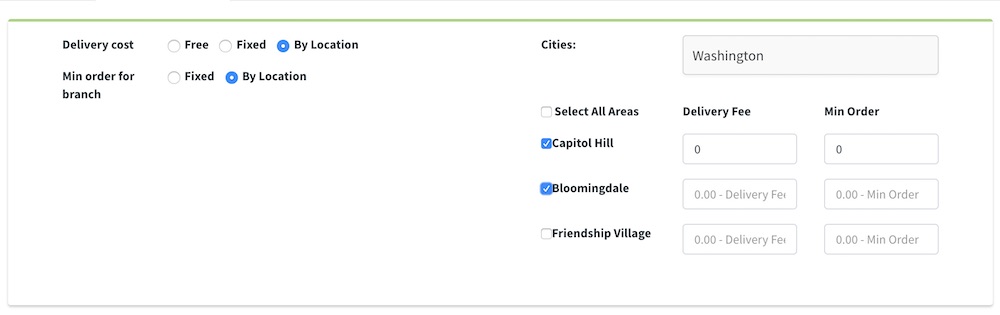
We had previously released the areas management feature to control which branch covers which areas. Now Taker is introducing a new feature that allows you to set the delivery fee and the minimum order cost for each area.

Sometimes, restaurants have different deliver fees based on how far the area is. Or, in some cases, they just don’t deliver below a certain cost to just avoid orders that make them lose rather than profit.

So to set that in Taker, just go to the branch -> delivery areas tab. There you’ll be able to either have free delivery, fixed one or per location. If you choose per location, then a new delivery fee field will show up next to each area the branch delivers to. This is also the same with minimum order, it can be either fixed or per location. So just choose per location then you’ll see also a new field to set the value.

Once that’s done, your customers through the website or app will dynamically see that. So they’ll now the delivery fee before completing the order. Also, they even can’t complete the order till the meet the minimum order requirement set for his area.


If your restaurant is looking for an online ordering system

contact us now.


Introducing Restaurant Areas Management

If you every got bothered by not knowing the best way to redirect your customers orders to the right branch, we solved it. We’re introducing a new advanced mechanism to set the restaurant areas for your online orders to directly go to the concerned branch.

Area Management

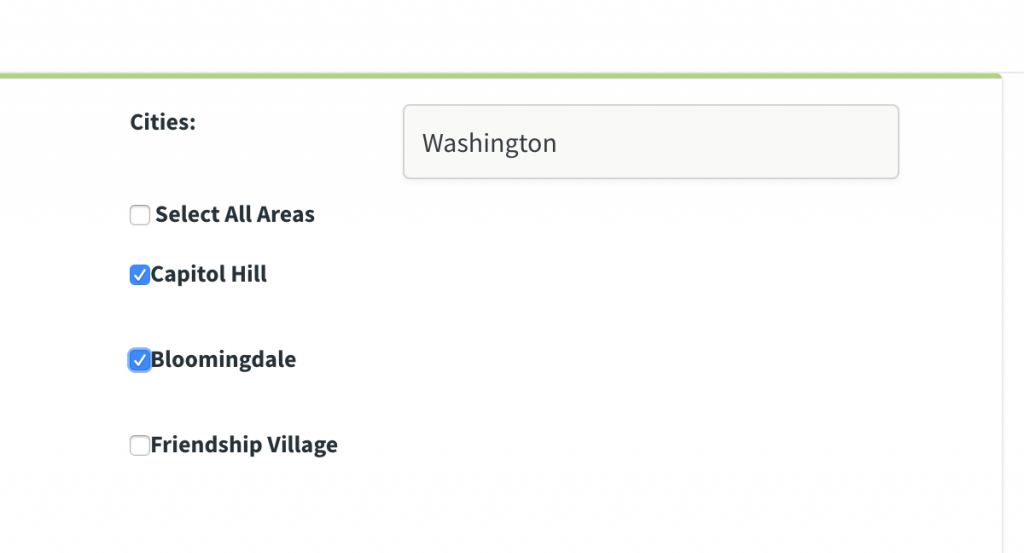
This feature helps restaurant chains with multiple branches and operating in multiple cities and countries. All you need to do is to add the countries and cities you’re operating in and add the restaurant areas inside those cities.

Choose Area

Then go to each branch that you have and set the country, city as well as the areas this particular branch is covering. So when your customer orders online either delivery or pickup, the order goes to this branch automatically.

Customer Location

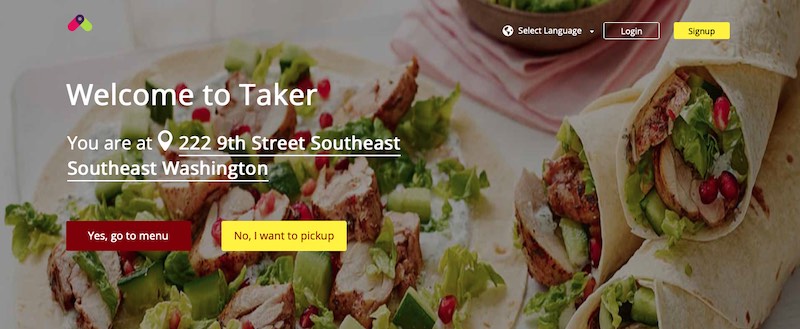
While the customer is ordering, Taker system automatically grabs his location in a very seamless way. This is a very convenient way as customers expect to place orders smoothly and conveniently.

Please visit our feature page to find out more about the other advanced features in Taker.


If your restaurant is looking for an online ordering system

contact us now.


Introducing Restaurant Promotions Engine

We can’t imagine an e-commerce website without promotions and discounts. Therefore, Taker is introducing an advanced promocode feature to create restaurant promotions and discounts for a better marketing.

As you all know, restaurant promotions and discounts help in many ways. They help with customers acquisition and retention as well as improving the re-ordering rate. The ultimate goal is to grow the sales.

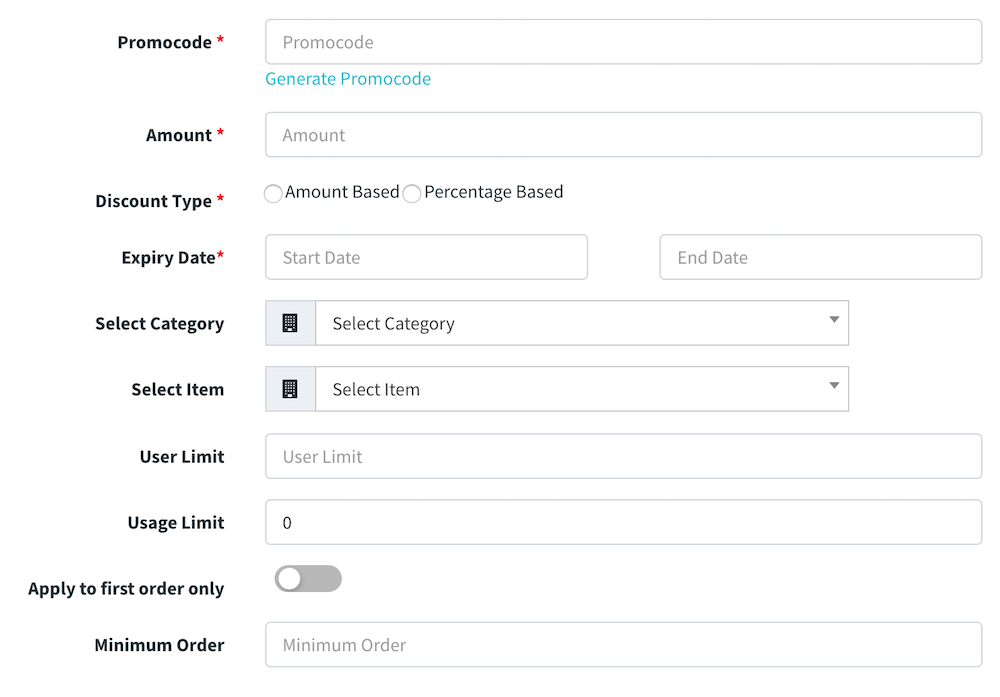
Here is the details of how to create restaurant promotions (promocode):
– Code: this is the actual code to be entered to get the discount. It can be auto-generated.
– Amount: This is how much you want to discount. It could be fixed amount or a percentage.
– Dates: start and end of the promocode.
– Category: this allows you to apply the restaurant promotions to a certain category only.
– Item: this allows you to apply the promocode to a certain item only.
– User Limit: this is to define how many users to use this promocode. Leave it empty if unlimited.
– Usage Limit: this is to define how many times a user can use it. Leave it empty if unlimited
– Apply to First Order: this means the promocode can only be applied if it’s the first order for the user. This helps with customer acquisition.
– Minimum Order: you can set the minimum below which customer can’t apply the restaurant promotions.


If your restaurant is looking for an online ordering system

contact us now.


Notifications Center

One of most important things for businesses is to communicate with your customers. The notification center feature allows you to do that easily and professionally. You have two types, Automatic where you configure Taker to automatically send messages based on certain triggers and Manual messaging where you send to all. Methods of delivery include Email, SMS and App Notifications.

Automatic Messaging

In this section you can define the following:

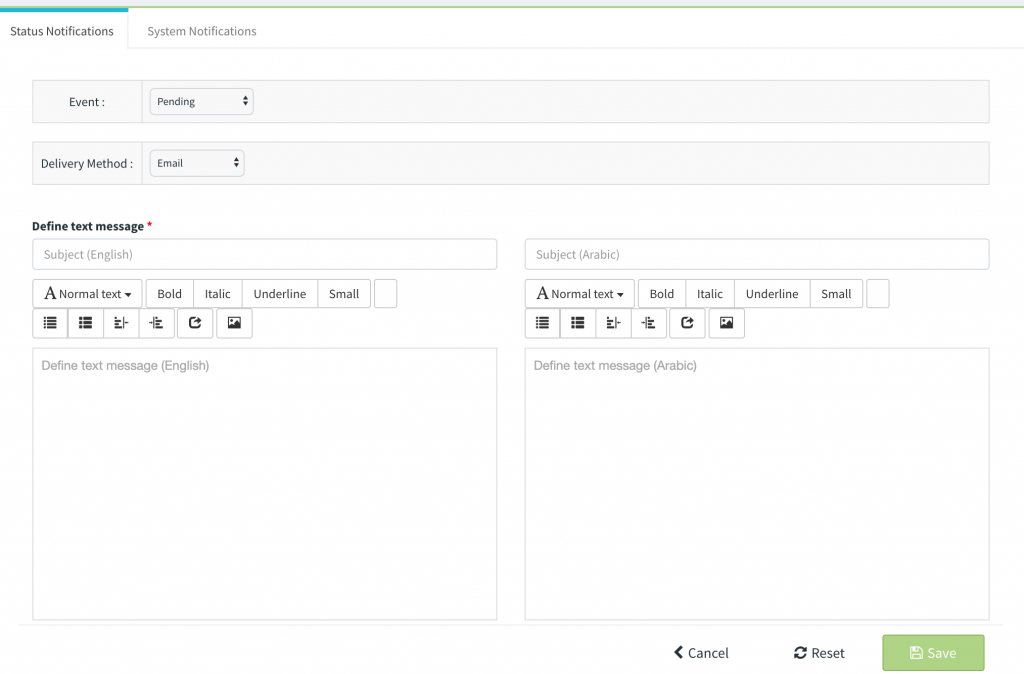
Status Notification:

Here you can define the message to send to the customer and choose which order status to to trigger this message and through which channel, Email, SMS and App Notification.

System Notification:

Here you can the content of the messages sent by the system to customers such as OTP and address update messages.

Manual Messaging

Here you can send a message to all customers through Email, SMS or App Notification.


If your restaurant is looking for an online ordering system

contact us now.


Foodics Integration

We are thrilled to announce that Taker and Foodics integration is now out of beta.

Foodics is one of the most advanced cloud POS systems out there. It has robust technology and infrastructure to help restaurants manage their operations and financials easily. It has over 4000 customers and processed over 1 billion orders at an average of 5 million transactions a minute. Foodics isn’t only a POS, rather, it provides restaurants with a complete restaurant management suite. It includes POS, kitchen display system, call center management, table management, waiters digital menu, reports and analytics and employee timesheet. Along with that, it has a wide variety of different systems and solution integrated with it such as accounting and loyalty. This really helps restaurants have all of what they need with easily within their central POS system.

We believe this strategic partnership is for the benefit of our mutual customers. With the integration, your operations have become so easily managed as your online orders automatically go to Foodics.

If you’re starting a new restaurant or considering changing your technology, contact us for a combined cost-effective solution.