
Restaurant Menu Items per Branch

Taker is bringing to you a new feature that allows you to control the availability of your restaurant menu items for each branch. A common scenario is that restaurants with multiple branches might run out of a specific item in a specific branch. In this case, you would want to stop this item from being available in the restaurant menu so customers won’t be able to order it.

One of the worse things that negatively affects the experience of the customers is when he orders then finds out later what he ordered isn’t available. However, with this great feature, this will never happen because customers won’t even see the item in the menu of the website or the app. If you’re using Taker’s Kiosk, item availability also applies
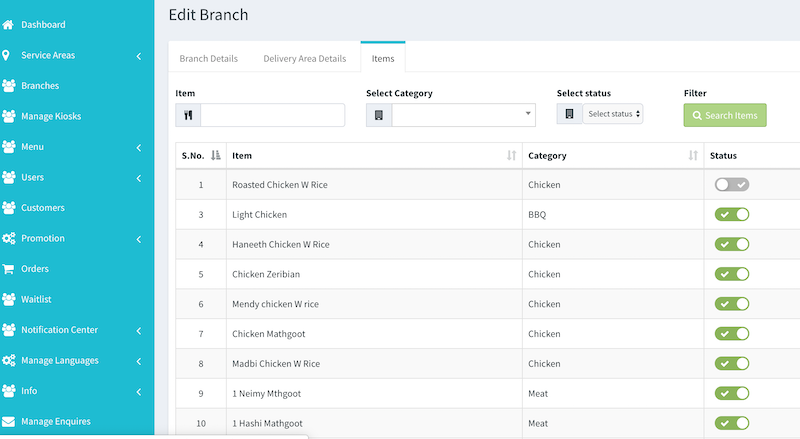
Restaurant Menu item

To configure that, go to Branches then edit the branch that you want to disable items for then you’ll see a toggle button to switch on and off. Once this is done, customers won’t see this item if ordering from this particular branch.


If your restaurant is looking for an online ordering system
contact us now.


Delivery Fee & Minimum Order

We had previously released the areas management feature to control which branch covers which areas. Now Taker is introducing a new feature that allows you to set the delivery fee and the minimum order cost for each area.

Sometimes, restaurants have different deliver fees based on how far the area is. Or, in some cases, they just don’t deliver below a certain cost to just avoid orders that make them lose rather than profit.

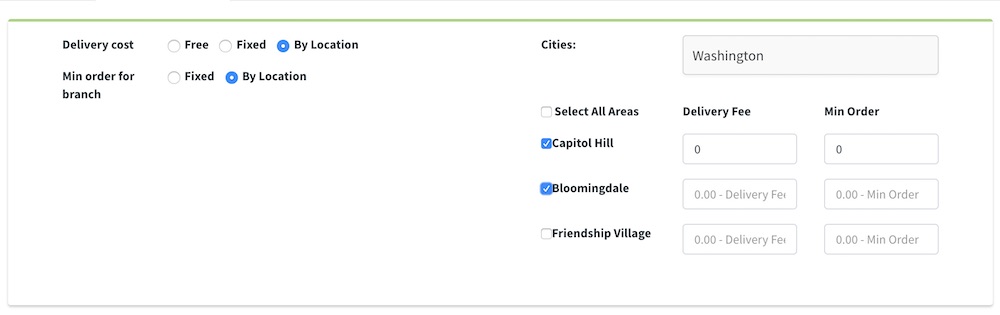
So to set that in Taker, just go to the branch -> delivery areas tab. There you’ll be able to either have free delivery, fixed one or per location. If you choose per location, then a new delivery fee field will show up next to each area the branch delivers to. This is also the same with minimum order, it can be either fixed or per location. So just choose per location then you’ll see also a new field to set the value.

Once that’s done, your customers through the website or app will dynamically see that. So they’ll now the delivery fee before completing the order. Also, they even can’t complete the order till the meet the minimum order requirement set for his area.


If your restaurant is looking for an online ordering system

contact us now.


A New Update for Online Payment Report & More – June 2019

This month includes new features and improvements as follows:

Online Payment Report for Branches

In Branch Report, we’ve added how many orders paid online and how much money was that for each branch. 

Foodics – Order Cancelling 

Now restaurants can cancel the order right from Foodics which will change the order status on Taker.

Waitlist Improvements

We’ve done a few improvements in the waitlist add-on to help you manage it more easily. Those improvements are:

  • You can search for a reservation using any data from the customer, like a mobile number. 
  • Now restaurant staff can create a reservation for the customer right from his panel.
  • If the reservation is attended, you can’t cancel it anymore.
  • Now you can customize the messages sent to customers.